
See margin pressure earlier
Find incomplete costs and dishes above your food-cost target. Model ingredient-price increases before deciding what to reprice.
FOR RESTAURANTS, HOTELS & RESORTS IN BELIZE
Bring recipes, ingredient prices and food-cost reports together. Give your kitchen a clear recipe book and your business a clearer view of every plate.
Recipe management and food-cost software for independent restaurants and resort dining teams.

TAKE A LOOK INSIDE
Username belize-demo
Password ExploreAMS2026!
SEE THE SYSTEM AT WORK
Watch the actual demo screens with Microsoft Aria narration, captions and 11 chapters. See how ingredients become recipe costs, pricing scenarios and useful reports.
Ready to explore the screens yourself?
Open the read-only demo ↗A CLEARER VIEW OF YOUR KITCHEN
Find incomplete costs and dishes above your food-cost target. Model ingredient-price increases before deciding what to reprice.
Keep quantities, compatible usage units, batch yields and preparation methods in one recipe record for your kitchen team.
Bring owners, managers, chefs and purchasing staff into the same system with access suited to their responsibilities.
Review the fictional restaurant’s recipes and reports.
See the demo for yourself ↗THE CORE FEATURE SET
Practical tools for recipe management, food-cost control and kitchen operations, with setup and learning resources for each property.
Keep ingredient quantities, preparation methods, batch yields and portion units together. Use prepared ingredients and sub-recipes in other dishes.
Turn purchase-pack quantities and prices into a cost per inventory unit, with conversions between compatible mass or volume units.
Review plate cost, selling price, food-cost percentage, food-only margin and the selling price needed to meet your target.
Model ingredient-price movements, filter recipes over target and open the component breakdown to identify cost drivers.
Record effective dates and reasons for cost changes. Compare recorded costs across calendar years without treating missing history as zero.
Record batches actually prepared. AMS checks available raw stock, expands recipe components and applies compatible unit conversions.
Maintain supplier contacts, review stock on hand and set ingredient thresholds that flag stock needing attention.
Use templates for suppliers, ingredients, recipes and components. Preview and validate rows before confirming the import.
Export filtered food-cost projections and cost comparisons to CSV or PDF for management reviews and kitchen discussions.
Assign Owner, Manager, Chef, Purchasing or Read-only roles, or customise View, Add, Edit and Delete access by module.
Configure your business name, logo, colours, currency label, timezone and food-cost target for each separate property installation.
Help staff get started with guided property setup, searchable Help, a downloadable PDF user guide and a captioned video walkthrough.
View operational records in the demo. The video also shows administrator workflows.
Explore the feature demo ↗MAKE PRICING A CONVERSATION WITH NUMBERS
Use a food-cost scenario to compare current plate cost, projected cost, selling price and price at target. Open a dish to see which ingredients drive the result.
In the fictional example, a 20% ingredient-cost increase moves a $2.25 plate to $2.70. At a $12 selling price, projected food cost becomes 22.5%.
Try the costing reports ↗Illustrative demo figures. Food-only estimates exclude labour, overhead and tax adjustments. Scenarios do not change saved prices.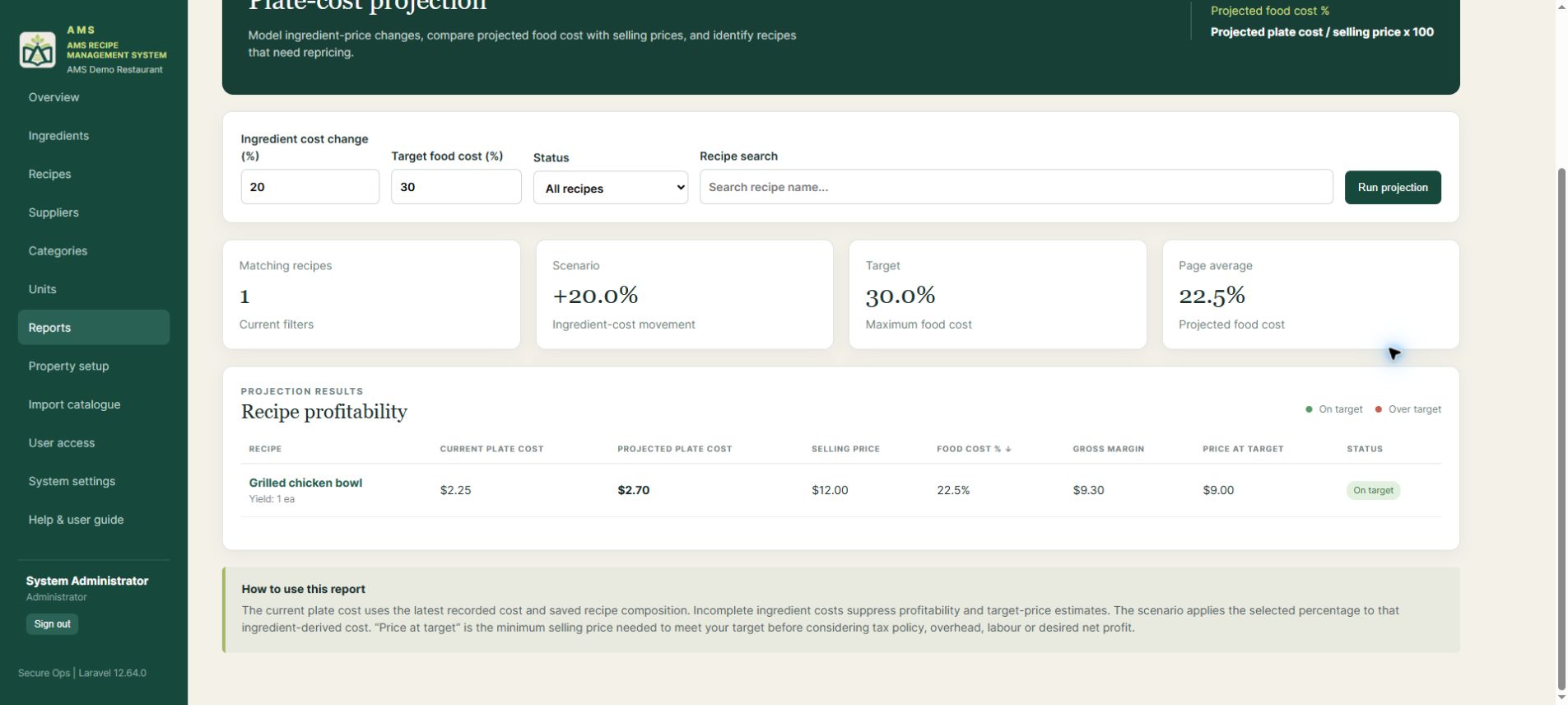
A WORKFLOW THAT MAKES SENSE
Keep property setup and day-to-day kitchen work connected.
Confirm branding, currency, timezone, target food cost and standard units.
Add suppliers and ingredients, record costs, then create recipes or import a prepared file.
Check dish profitability, record actual production and keep ingredient prices current.
Give staff appropriate access and export reports for management reviews.
Start with a sample catalogue that is already set up.
Open the working demo ↗FOR BELIZE’S HOSPITALITY BUSINESSES
Looking for restaurant recipe management or food-cost software in Belize? AMS brings ingredient costing, recipe records and management reports together for restaurants and restaurants within hotels and resorts.
Recipe costing and menu-price visibility for San Pedro restaurants and hotel dining teams.
A shared recipe reference and food-cost reports for Placencia restaurants and resort kitchens.
Ingredient-cost records, consistent batch yields and staff access for Hopkins dining operations.
Supplier contacts, recipe costs and low-stock visibility for Caye Caulker restaurant teams.
See whether the workflow fits your restaurant or property.
Explore the Belize restaurant demo ↗BEFORE YOU TAKE A LOOK
Browse fictional ingredients, recipes, suppliers and units, inspect cost history, run report scenarios and download reports or the user guide. The shared account is read-only. It cannot edit records, record production, import data, change settings or manage users.
Open the read-only demo →The walkthrough shows property setup, catalogue imports, role presets and branding settings. These administrator features are available in a property installation; the public visitor account has operational viewing access.
Watch the walkthrough →Each property runs its own installation and database, with its own branding, regional defaults, staff access and catalogue. Guided setup, import templates and the built-in PDF guide help teams get started.
Explore an example property →Property settings include currency code, currency symbol and timezone. Compatible mass and volume units can be converted in recipe usage. Changing the currency label does not convert existing prices.
View the demo catalogue →BRING AMS TO YOUR PROPERTY
Interested in AMS for a restaurant, hotel or resort? Share a few details and the Aesthetics Marketing team will follow up about getting the system for your property.
Tell us what you want to improve: recipe consistency, ingredient costing, menu-price reviews, kitchen production or staff access.
We can discuss the property setup, your existing catalogue and how your team would use AMS.
Explore the demo while you wait ↗Prefer email? Contact Aesthetics Marketing.
YOUR NEXT STEP
Explore the recipe book. Review a dish’s food cost. Run a price-rise scenario. See how the workflow could fit your team.
belize-demoExploreAMS2026!These details are intentionally public. All records are fictional and changes are disabled.
Go to the demo sign-in →